KioskGuard App Versions ChangeLog – Internal
Initial stable version – KioskGuard 0.2.0 (10.3.26)
- OS locking feature
- Full browser functionality
- Top navigation bar with back/forward, home links and URL bar, which works with both Enter key and a “Go” button on the right
- Basic admin area, which is accessible via a secret key combination
KioskGuard 0.3.0 (20.4.26)
- Added touch/tap to bring the admin password (for when there is no keyboard attached to the kiosk)
- Properly implemented Autostart in restricted user
- Removed desktop showing at start
- Added “Sign out user” button in admin
- Implemented the Screensaver with Timeouts, Images order and Show Dir Path options
- Added a great Onscreen keyboard for when user taps in a text field
KioskGuard 0.4.0 (23.5.26)
- Fixed the “Sign out user” option error
- Now the admin popup doesn’t have the transparent background
KioskGuard 0.5.0 (05.6.26)
- Added the app version number on the admin panel
- Added a virtual keyboard in the admin password popup
KioskGuard 0.6.0 (20.6.26)
- Added the option to “Clean cache and cookies when return home”
- Revamped the admin GUI a little
KioskGuard 0.7.0 (27.6.26)
- I also realised that the app should not be locked to kiosks, so the name should not contain it necessarily, so I renamed it “PCGuard“
- Added an option to read the host/PC name from within the current website via JS code.
PCGuard.computerName // or PCGuard.getComputerName()
KioskGuard 0.8.0 (27.6.26)
- Whitelabeled/Rebranded for K4B – Oobladi-24
- This is done with a half-generic way to deal with white labelling with centralised app name – Renamed it Oobladi-24
- Now the keyboard spans 1/3 of the height and has the first row numbers and the special char key with the right chars (not containing “123”)
KioskGuard 0.9.0 (4.7.26)
- Added the “About us” page with the credits for Webcreative
- Increased the version – NEARLY THERE! 🙂
KioskGuard 1.0.0 – Oobladi-24 (20.7.26)
🛡️ 1. Windows Lockdown & Auto-Login System
- Zero-Console-Flash Execution: Suppressed all background PowerShell window popups (
-WindowStyle Hidden) during automated system policy changes and account provisioning. - Per-User Shell Registry Lockdown: Refined
 configure-autologin.ps1 and set-kiosk-shell-reg.ps1 to pre-stage user profiles and replace Windows
 explorer.exewithKioskGuard.exewithout desktop flashes. - Unified Auto-Login Controls: Consolidated auto-login setup, credential storage, and shell configuration into a dynamic single-button toggle in
 lockdown.html and
  lockdown.js.
 - UAC Escalation Handling: Restored interactive UAC elevation prompts for system-level scripts while standard administrative IPC functions run silently.
⌨️ 2. On-Screen Virtual Keyboard
- Virtual Touch Keyboard Integration: Implemented a standalone virtual keyboard system (kioskKeyboard.js & kioskKeyboardPreload.js) for touchscreens.
- Context Isolation & Event Reliability: Resolved context isolation conflicts, key listener initialization bugs, and duplicate key press events.
- Configurable Display Settings: Added toggles in the General Settings panel to show/hide or adjust the on-screen keyboard.
🖥️ 3. Screensaver & Idle Dashboard
- Screensaver Management UI: Built a dedicated Screensaver Settings dashboard (screensaver.html & screensaver.js).
- Idle Timeout & Modes: Added configurable idle timers, mode selections (URL display, video/image media slideshow, blank screen), and live preview capabilities.
🔒 4. Security & Kiosk Protection
- Content Security Policy (CSP): Enforced strict CSP meta tags in admin.html to guard against cross-site scripting and unauthorized inline injections.
- Bypass Prevention: Blocked
F11fullscreen toggling and prohibited unauthorized window/kiosk escape keys. - Bcrypt Admin Authentication: Implemented secure
bcryptjspassword hashing and added a Change Admin Password form in the General Settings panel (general.js). - Admin Sign Out: Added explicit administrative session sign-out functionality.
🎨 5. UI/UX & Custom Branding
- Product Branding: Rebranded application to KioskGuard (
oobladi-24), updated icon generation scripts (generate-ico.ps1), and replaced default assets with high-resolution transparent branding icons (assets/icon_real_trsp.png). - Address Bar Toggle: Added
showAddressBaroption ingeneral.html to allow hiding/showing navigation controls dynamically. - Layout Squeeze & Icon Sizing: Fixed dropdown squeeze issues in the admin panel and enlarged navigation Home icons for touch UI accessibility.
⚙️ 6. Core Architecture & Compatibility
- Electron 32 WebContentsView Migration: Upgraded view rendering architecture from deprecated
BrowserViewtoWebContentsView(kioskWindow.js) for full Electron 32 compatibility. - IPC Channel Refinement: Streamlined main process IPC handlers (ipc.js) and admin preload bindings (adminPreload.js) for return value parsing and system state checking.
📁 Primary Files Modified / Added
- Main Process: kioskWindow.js, ipc.js, windowsLockdown.js, kioskKeyboard.js, adminPreload.js
- Renderer / Admin: lockdown.html, lockdown.js, general.html, general.js, screensaver.html, screensaver.js
- PowerShell Scripts: configure-autologin.ps1, set-kiosk-shell-reg.ps1, create-kiosk-user.ps1, restore-explorer.ps1, disable-ctrl-alt-del.ps1
KioskGuard 1.0.1 – Oobladi-24 (15.8.26)
Added New Admin Option (left main menu): Privacy & Cleanup
Event-Based Session Cleanup
Configure automated session resets when specific navigation or system events occur.Clear cookies & session data when clicking Home buttonClear cookies & session data on Kiosk app startupClear cookies & session data when Screensaver starts (when Screensaver is enabled)
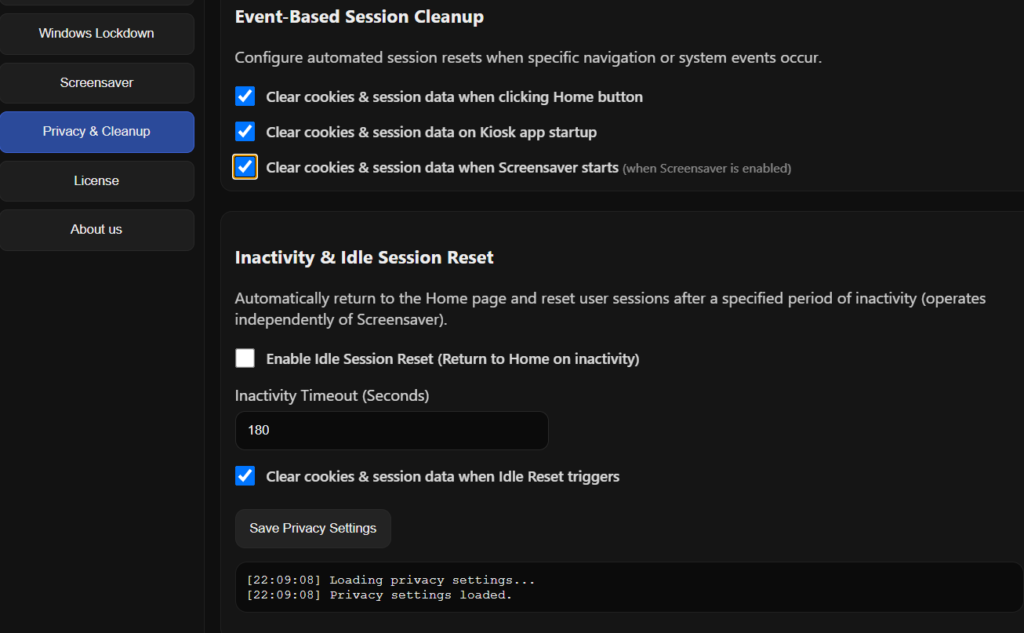
Moved the “clear cookies” options from the Screen saver into the one above.
Another important feature is disabling the Windows asking for user to change the password in the future. (still not fully tested, but we will see, it should work fine)
