This small post is especially for those who want to use Blender in conjunction with or to integrate 3D models into the world of WebGL or Three.js. One of the best formats to use in this case is the GLTF or GLB (its more archived version).
Blender has full support for this and it’s one of the best tools to use for repairing, smoothing and generally editing any type of 3D model format that is importable in Blender so then to be able to easily export it as GLTF which is the default or most popular model format for Three.js.
NOTES:
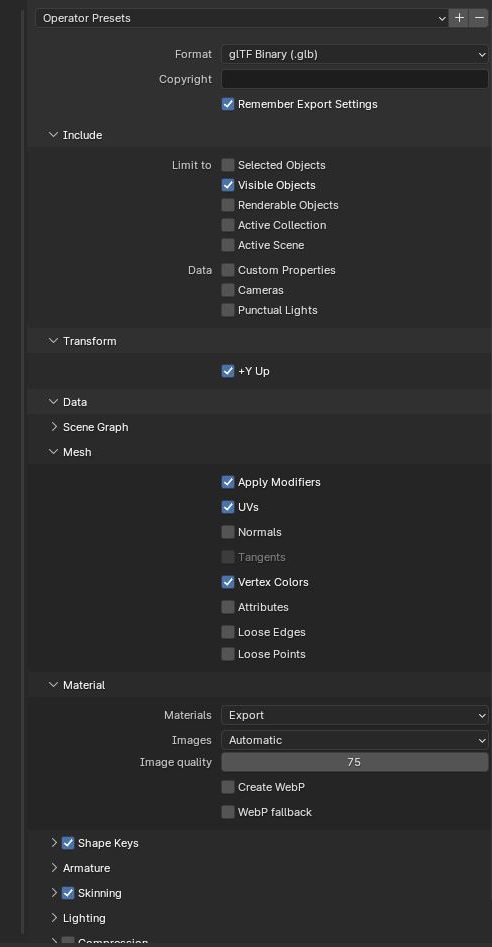
Tick Visible Objects in case in your Blender Collection tree you have some objects that you want to keep as backup, so you duplicate them and then HIDE them. In this case you need this option so they are kept out of the GLB exported file.
Something makes a big difference in the exported file size. Sometimes it’s 15 MB and sometimes 2GB. It seems like when you tick “Mesh > Apply Modifiers” it has the lowest size, while keeping all the details.
Hi all. I had this issue a few times and I thought I should write a quick post about it in case it can helps others.
So firstly, the model is an imported WRML format of an external work done in SolidWorks. It originally had textures and colours for various parts and objects, but when imported, the parts are not colored anymore.
The main problem was when exporting as a GLB/GLTF file format, the entire model remained in one color.
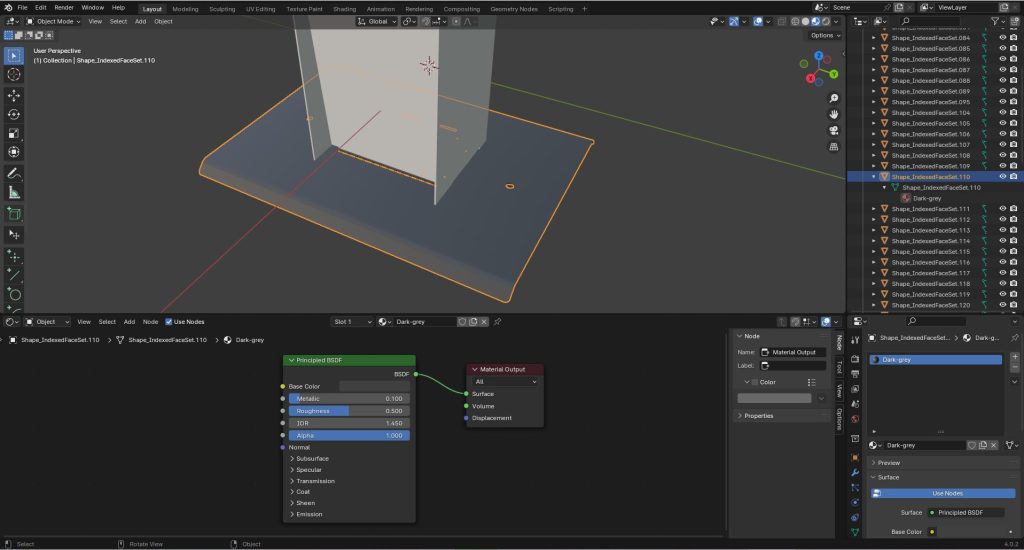
SOLUTION: what worked is deleted the original color of the object (menu right under the Collection objects tree), then created a new material (i.e. Dark-gey) and left the default “Principle BDSF” and chose the desired colour.
It help to maybe open at the bottom the Shade Editor (the shows the nodes that are actually used and how they work together) and make sure that the colour is outputted to the correct material.
NOTE: there are quite a lot of EXPORT settings for the GLB format, so here are the ones that worked for this:
Mesh: make sure these are ticked: – UVs – Normals – Vertex Colors
These are my own documentation to help me get more into the OOP coding style, from the position of using functional PHP professionally for quite a while. So these are just some notes, but I thought to make them public in case they might be useful to anyone else:
The four pillars for OOP are Abstraction, Encapsulation, Inheritance, Polymorphism.
Abstraction: Abstraction is the process of showing only essential/necessary features of an entity/object to the outside world and hiding other irrelevant information. For example, to open your TV we only have a power button, It is not required to understand how infra-red waves are getting generated in TV remote control.
Encapsulation: Encapsulation means wrapping up data and member function (Method) together into a single unit i.e. class. Encapsulation automatically achieve the concept of data hiding providing security to data by making the variable as private and exposing the property to access the private data which would be public.
Inheritance: The ability to create a new class from an existing class. Inheritance is when an object acquires the property of another object. Inheritance allows a class (subclass) to acquire the properties and behaviour of another class (super-class). It helps to reuse, customize and enhance the existing code. So it helps to write code accurately and reduce the development time.
Polymorphism: Polymorphism is derived from 2 Greek words: poly and morphs. The word “poly” means many and “morphs” means forms. So polymorphism means “many forms”. A subclass can define its own unique behaviour and still share the same functionalities or behavior of its parent/base class. A subclass can have their own behavior and share some of its behavior from its parent class not the other way around. A parent class cannot have the behavior of its subclass.
Riding along the Kennet River from Aldermaston to Reading offers a picturesque journey with several interesting places along the way. I did the ride by bike and it takes about 1.5 to 2 hours (depending on the speed) and it’s full of relaxing and enchanting sceneries. Here’s a list of some noteworthy spots you might encounter:
– Aldermaston Wharf: Start your journey in Aldermaston, a village known for Aldermaston Court and the Atomic Weapons Establishment. The wharf is a hub for narrowboat activity. – Theale: As you ride towards Reading, you’ll pass through Theale, a charming village with a historic church and Theale Green Recreation Ground. – Sulhamstead: This village is known for its beautiful parish church, St. Mary’s Church, and nearby Sulhamstead House. – Tutts Clump: Look out for Tutts Clump, a small hamlet with an interesting history and possibly a place to stop for a break. – Ufton Nervet: This picturesque village has a historic church, St. Peter’s, and is known for the nearby Ufton Court, a Tudor manor house. – Burghfield: This large village has several historical buildings, including St. Mary’s Church, and is surrounded by scenic countryside. – Fobney Lock: A lock along the Kennet River, providing a nice spot to observe the functioning of the lock system. – Kennet and Avon Canal Museum: Located in Devizes, this museum might not be directly on your route but is dedicated to the history of the Kennet and Avon Canal, providing interesting insights into the waterway you’re riding along. – Southcote: A suburb of Reading, Southcote has Southcote Manor, a historic building with beautiful grounds. – Reading: Your journey concludes in Reading, a bustling town with a rich history. Explore Reading Abbey, the Forbury Gardens, and the Oracle Shopping Centre.
—————
An interesting fact, there are quite a few cool-looking locks along the Kennet River. The stretch of the Kennet and Avon Canal from Aldermaston Wharf to Reading includes several locks. Below is a list of locks you would encounter along this route: – Aldermaston Lock (Lock 91): Located near Aldermaston Wharf, this is the starting point for your journey. – Woolhampton Lock (Lock 92): Progressing southeast, you’ll reach – Heales Lock (Lock 93): Following Woolhampton Lock, you’ll come across Heales Lock. – Padworth Lock (Lock 94): Continuing along the canal, Padworth Lock is the next lock on your route. – Garston Lock (Lock 95): As you move closer to Reading, you’ll encounter Garston Lock. – Southcote Lock (Lock 96): This lock is located in the vicinity of Southcote, a suburb of Reading. – Fobney Lock (Lock 97): Further downstream, you’ll reach Fobney Lock. – Blakes Lock (Lock 98): As you approach Reading, Blakes Lock is the last lock on this part of the Kennet and Avon Canal. Please note that the Kennet and Avon Canal has a total of 105 locks, and the locks listed here represent only a portion of the entire canal system. Each lock serves the purpose of managing water levels to allow boats to navigate changes in elevation along the canal route.
Remember that the charm of such a journey lies not only in the major landmarks but also in the tranquil stretches of the riverbank, the quaint villages, and the natural beauty along the way.